README
@binssoft/ngx-captcha
A plugins to build your own captcha for your angular application. This plugin will help you to add CAPTCHA in your application form where you want to prevent the access for a BOT.









Please support this project by simply putting a Github star. Share this library with friends on Twitter and everywhere else you can.
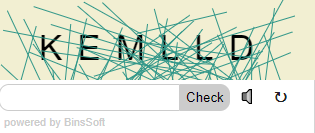

Table of contents:
Getting started
Installation
npm install @binssoft/ngx-captcha --save
Implementation
import "NgxCaptchaModule" in your application module. For example: app.module.ts
import {NgxCaptchaModule} from  '@binssoft/ngx-captcha';
@NgModule({
    imports:[
        NgxCaptchaModule
        ...
    ]
})
export  class  AppModule { }
add configration in your component. For example : app.component.ts
import {NgxCaptchaService} from  '@binssoft/ngx-captcha'

export  class  AppComponent  implements  OnInit {
captchaStatus:any = null;
captchaConfig:any = {
   length:6,
   cssClass:'custom',
   back: {
     stroke:"#2F9688",
     solid:"#f2efd2"
   } ,
   font:{
    color:"#000000",
    size:"35px"
   }
 };

 constructor(private captchaService:NgxCaptchaService){}
 ngOnInit() {
      this.captchaService.captchStatus.subscribe((status)=>{
        this.captchaStatus= status;
        if (status == false) {
          alert("Opps!\nCaptcha mismatch");
        } else  if (status == true) {
          alert("Success!\nYou are right");
        }
      });
 }
}
Add ngx-captcha html tag in your component html. For example : app.component.html
<ngx-captcha [config]="captchaConfig"></ngx-captcha>
- [config] : to set the pagination configuration
Settings Option
| Description | Default Value | |
|---|---|---|
type |
1 or 2 (EX: 1= alpha numaric characters to type, 2= solve a smiple calculation) | 1 |
length |
length of characters you want to show | 6 |
cssClass |
custom class you want to add for your own theme | |
font |
set the text font style | |
font.size |
set the size of display text | 40px |
font.family |
set the font family of display text | Arial |
back |
set the background of the captcha box | |
back.stroke |
if you want to add the strock in the background, add the color code | |
back.solid |
if you want to add a solid color in your captcha body, add the color code | #f2efd2 |
Demo
Click Here for the demo